THE SHORT ANSWER
Recorded CCTV tells you what happened. Live video monitoring lets someone act while it is happening. A recorder saves video for later. A monitoring service adds a person who reviews alerts in real time, can speak to someone on site through a speaker, and follows your plan for who to call. Recording alone can be enough for low-risk, staffed areas. It is a weak fit for a commercial site that sits empty at night.
Most business cameras are bought to answer one question: “Do we have footage?” Live monitoring answers a different one: “Can anyone do something before the damage is done?”
This guide is a direct comparison for commercial property owners, managers and operators. It does not explain the full monitoring process step by step. For that, read what remote video monitoring is and how live agents work. Here, the goal is simpler: help you decide whether recording is enough for your site.
Recorded CCTV vs. live monitoring at a glance
The two systems can use the same cameras. What changes is what happens around them.
| Question | Recorded CCTV only | Live video monitoring |
|---|---|---|
Detection |
Cameras record. Motion alerts, if turned on, go to a phone or an inbox | Software flags people and vehicles in zones you choose, then a person checks the alert |
Who watches |
Nobody, until someone reviews the footage | A live agent at a monitoring center, during the hours you pick |
Real-time warning |
None. The system cannot speak to anyone on site | The agent can speak through an on-site speaker, where the site has one |
Who gets told |
You, if you see a phone alert in time | Your contacts in the order your plan sets, and the police when the plan’s criteria are met |
Evidence |
Raw footage you must search yourself | Footage plus a log of the times, clips and what the agent did |
Typical use |
Records, disputes, checking what happened after the fact | Sites that are empty at night, hold valuable things or cover a lot of ground |
Notice what the table does not say: that one is “smart” and the other is “dumb.” Recording is useful. It just does a different job.
The same 1:40 a.m. event, two ways
More cameras aren’t automatically better. What matters is whether the system can see the gate, the equipment or the area you care about.
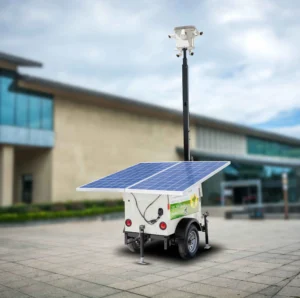
GuardVision offers two main trailer platforms in Texas. Titan Solar, a solar-powered mobile security camera trailer, carries its own power. Titan, a mobile security camera trailer that runs on site electricity with battery backup, suits sites that already have an outlet. Which one fits is part of the quote, not something to guess from a web page.
Recorded only
- The camera records the person at the fence.
- Nobody is watching, and no one hears a warning.
- The equipment is gone before sunrise.
- At 7 a.m., the manager finds the cut fence and starts searching footage.
Live monitoring
- Software flags a person in the fence zone.
- An agent checks the clip and sees nobody is expected.
- The agent speaks through the site speaker and says the person is on camera.
- If the person stays, the agent follows the plan: calls your contact, and the police if the plan calls for it.
Version B is not magic. A warning does not stop everyone. What it changes is the timing: someone knows, and someone can act, while the person is still there.
What the research says, and what it does not
A review of 80 CCTV studies covering 40 years found that actively monitored cameras were tied to bigger drops in crime than passive ones. That fits the idea that a camera works better when someone can respond to it.
Two cautions. The review looks at crime across many places, not at your property, so treat it as a direction, not a promise. And it does not say that recording is useless. It says watching and responding adds something that recording alone does not.
GuardVision’s own data points the same way. At its Texas trailer sites, 7 in 10 verified incidents from January to September 2026 ended with the person leaving after a live warning. That figure comes from trailer sites in Texas, so it is a strong signal, not a forecast for your property.
“We already have cameras.” Fair, and here is the catch
This is the most common reply, and it is a reasonable one. Cameras you already own are an asset. Here is how the usual reasons for staying with recording hold up.
“Cameras scare people off by themselves.”
Sometimes. A visible camera can make an opportunist think twice. But someone who has already decided to cut the fence will not be stopped by a lens that nobody is watching. Deterrence is real. It is just not dependable on its own at night.
“I get alerts on my phone.”
Phone alerts help when someone sees them. At 2 a.m., an alert can sit unread until morning. They also depend on one person being awake, reachable and sure what to do. Live monitoring replaces that single point of failure with a team and a plan.
“Monitoring is one more monthly cost.”
It is. Ask for the monthly price and the hours it covers, and compare it with what an incident would cost you. If you are weighing it against a person on site, our camera trailer vs. security guard cost comparison shows how to set up that math without leaving duties uncovered.
“The footage helps me after a loss.”
It does, and you should keep recording. Monitoring does not replace recording. It sits on top of it. The recording is still your evidence. The difference is that someone may have acted before the loss was complete.
When recorded-only is fine
Live monitoring is not the right answer for every camera. Recording alone is often enough when:
- The area is staffed or busy during the hours that matter, so people are already watching.
- The cameras are for records, such as checking deliveries, disputes or safety reviews.
- The risk is low and the cost of a loss is small.
- The site has an on-site guard or a security team who already watch the video.
Adding monitoring to a low-risk interior hallway is not good value. It is better to say so than to sell it.
Signs recording is not enough
Consider live monitoring if several of these are true:
- The site is empty for long stretches, such as nights, weekends or holiday closures. The after-hours checklist for construction sites and our guide to holiday parking-lot security show how those gaps play out.
- Valuable items sit outside, such as equipment, vehicles, materials or inventory.
- A loss would be expensive or would stop work.
- Nobody is awake, on site and ready to act on a phone alert at night.
- You have had repeat incidents, or your insurer or a lender has asked for stronger protection.
No cameras, power or internet at the site?
In Texas, GuardVision’s mobile security camera trailers bring their own power and cellular connection, and monitoring can be added. Trailers are sold, rented and serviced in Texas only.
What live monitoring needs before it works
Monitoring is only as good as its setup. At a minimum:
- Supported cameras. GuardVision monitors LTS, GeoVision and UniFi camera systems at commercial sites, including systems another company installed. Other brands usually need to move to a supported platform.
- Cameras that cover the ways in, with clear images at night.
- A steady connection that can stream video when an alert fires.
- A written response plan: who is allowed on site, who to call and when to call the police.
A speaker lets an agent talk to the person. Without one, an agent can still check and escalate, but cannot speak on site. For the full list, see what you need for remote video monitoring.
How to decide in five questions
01
When is the site unwatched? List the hours nobody is there and nobody checks alerts.
02
What would a loss cost? Count the item, the repair or replacement, and lost work time.
03
Who acts at 2 a.m.? If the honest answer is “nobody,” recording alone is a gap.
04
Are your cameras supported? Check that they are LTS, GeoVision or UniFi, and that they see the entries.
05
What hours do you need? After hours, nights plus weekends, or 24/7. Pay for the hours that carry the risk.
If you cannot answer the first three, ask a specialist to walk the site with you. Some sites need monitoring on a few gates, not the whole property.
Frequently asked questions
What is the difference between CCTV and live video monitoring?
CCTV is the cameras and the recorder. Live video monitoring is a service on top of them, where a person reviews important events as they happen and follows your response plan. The same cameras can do both jobs. The difference is who is watching, and when.
Can recorded CCTV stop a crime?
Visible cameras may make some people think twice, but a recorder cannot warn anyone, call anyone or react to what is on screen. Stopping an event in progress takes a person or a system that acts on the video as it comes in.
Is live video monitoring worth it if I already have cameras?
It can be, when the site holds valuable things, sits empty for long stretches and nobody can check alerts at night. If the cameras are low-risk, in a staffed area, or only there for records, recording alone may be enough. The checklist in this guide helps you decide.
Can GuardVision monitor the cameras I already have?
Yes, if they are LTS, GeoVision or UniFi systems at a commercial site, even if another company installed them. GuardVision checks your exact cameras and recorder first. Other brands usually need to move to a supported platform.
Does live monitoring mean the police will always come?
No. A monitoring agent follows your response plan, which can include calling the police when its criteria are met. No monitoring company can promise whether or how fast police will arrive. That is up to the local department.
Is live monitoring only for businesses in Texas?
No. Remote video monitoring is available nationwide for commercial sites with supported cameras. The camera trailers themselves are sold, rented, installed and serviced in Texas only.